Model Context Protocol (MCP)
ForgeReq is a first-class MCP client — a drop-in alternative to the official MCP Inspector with the full ForgeReq workbench (vault, realms, {{var}} interpolation, proxy, TLS, mTLS, OAuth 2.1, AI Assistant) layered on top.
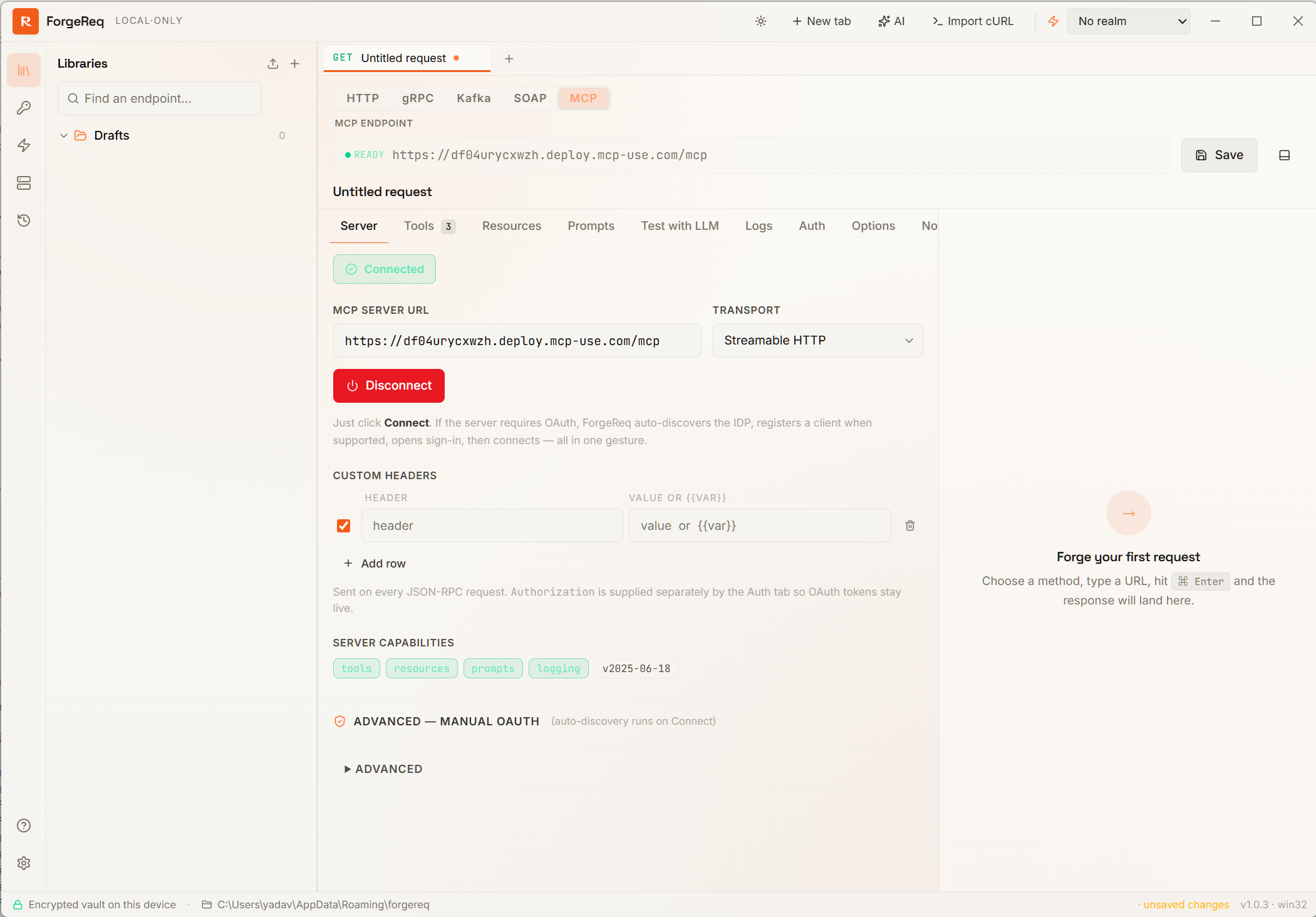
Switch any request tab to MCP and you get a long-lived JSON-RPC session against the configured server, plus tabs for every method the spec defines. The endpoint behaves like every other endpoint — same vault, same variable substitution, same proxy / TLS rules — but the tab strip is MCP-specific.
At a glance
- Both transports. Streamable HTTP (current spec) and legacy Server-Sent Events.
- Inspector-grade UI.
tools/list+tools/call,resources/list+resources/read,prompts/list+prompts/get,logging/setLevel. - One-click OAuth 2.1. Discovery (RFC 9728 + 8414), Dynamic Client Registration (RFC 7591), and PKCE — all triggered by a single Connect click.
- Server-driven UX.
sampling/createMessage,elicitation/create(form + url modes), andnotifications/cancelledare all fully implemented. - MCP Apps (SEP-1865). Tools that ship interactive
ui://HTML views render inline in a sandboxed iframe with the full postMessage bridge. - Test with LLM. A built-in agentic playground that hands the connected server’s tools to an LLM of your choice.
- Bring-your-own everything. The same encrypted vault, the same realms, the same proxy / mTLS settings every other ForgeReq endpoint uses.
One-click Connect
Click Connect and ForgeReq drives the entire MCP sign-in dance in one gesture:
- Initial handshake against the configured server URL.
- On
401, auto-discover OAuth metadata at the server’s origin (oauth-protected-resource+oauth-authorization-server). - Dynamic Client Registration when the IDP advertises a registration endpoint, with sensible defaults so DCR works against major providers.
- Open the PKCE sign-in window in your system browser (or an embedded Electron window — configurable).
- Retry the connect with the freshly minted bearer.
An inline status line narrates each stage. A red Cancel button next to Signing in… / Connecting… aborts the loopback listener, tears down any half-open session, and short-circuits the auto-flow — no orphaned tabs or zombie OAuth windows.
Manual Discover Auth / Register Client buttons remain available under an Advanced disclosure for debugging IDPs that don’t expose discovery.
Tabs
Server
Server URL, transport selector (Streamable HTTP or legacy SSE), custom headers, Connect / Disconnect, capabilities readout, the Cancel-aware sign-in flow described above. Custom headers apply to every JSON-RPC frame; Authorization is supplied separately by the Auth tab so OAuth tokens stay live as they refresh.
Tools
Fetches tools/list and renders the selected tool’s inputSchema as a JSON-Schema-driven form. Required fields are highlighted on first Call. The form supports {{var}} interpolation in every string leaf so you can drive a tool with your active realm.
- Clipboard icon copies the literal JSON-RPC envelope the Call button would send — handy for replaying the call in
curl,mcp-inspector, or another client. - Cancel button appears in place of Call while the request is in flight. Clicking it sends
notifications/cancelledto the server, releases the local pending promise, and the response viewer renderscancelledas the status.
The result lands in the shared response viewer, identical to how HTTP / gRPC / Kafka / SOAP results render.
Resources
resources/list + resources/read. Text resources preview inline; binary blobs show as base64 with a copy button.
Prompts
prompts/list + prompts/get. The returned messages render in the response viewer.
Test with LLM
Pick one of your registered AI providers + a model, type a prompt, and watch the model autonomously call the connected server’s tools. Each step (assistant text, tool call, tool result) is traced inline so you can see exactly what the model decided to do and why.
This is the fastest way to validate that a server’s tools behave correctly under real model usage before wiring them into the AI Assistant sidebar.
Logs
Append-only feed of server notifications + connection-state transitions. Includes a logging/setLevel selector when the server advertises the capability.
Auth
Reuses ForgeReq’s standard auth panel. Discovery prepopulates the OAuth 2.0 Authorization Code form so Get Access Token mints the bearer in one click — and the cached token writes back into the encrypted vault so it survives restarts.
OAuth 2.1 + Dynamic Client Registration
If the server publishes RFC 9728 oauth-protected-resource metadata (or RFC 8414 oauth-authorization-server metadata at its origin), Discover Auth captures the authorization / token / registration endpoints in one round-trip.
When the IDP advertises a registration endpoint, Register Client posts an RFC 7591 dynamic registration so you don’t need to pre-create the client. The minted client_id (and optional secret) write through to the Auth tab; the existing Get Access Token button then runs the PKCE flow exactly the same way it does for HTTP endpoints.
If the server doesn’t expose discovery metadata, fill in the OAuth fields manually on the Auth tab — the result is identical.
Sampling, elicitation, and cancellation
ForgeReq advertises the full set of client capabilities the MCP spec defines for an interactive host:
sampling/createMessage— when the connected server asks ForgeReq to call a language model on its behalf, a modal previews the conversation and lets you approve once or auto-approve for that endpoint. Approvals stream the completion through your chosen AI provider; rejections reply with a JSON-RPC error so the server doesn’t hang. If no AI provider is configured anywhere in ForgeReq we auto-reject with a clear message rather than block.elicitation/create— when the server asks for structured user input, a modal renders therequestedSchemavia the same JSON-Schema form the Tools tab uses. Bothformandurlelicitation modes are supported. You can Accept (send the answers), Decline (server keeps going without input), or Cancel (close the dialog).notifications/cancelled— every in-flighttools/call(and any other long-running request) is cancellable. The Server panel cancels Connect / sign-in; the Tools panel’s Cancel button cancels the live call. Cancellation is end-to-end: ForgeReq sends the spec notification, releases the local pending promise, and the response viewer renderscancelledas the status.
Transports
Streamable HTTP (current spec)
ForgeReq POSTs each JSON-RPC frame to the configured URL and accepts either a one-shot JSON response or an SSE-encoded stream of frames. Three transport-level details worth knowing:
- Live streaming. SSE frames are processed live, not buffered — so a single long-lived
tools/callPOST can interleave server-initiatedelicitation/createrequests without the request artificially deadlocking. Mcp-Session-Idis captured on initialize and echoed on every subsequent request so stateful servers stay correlated.- Standalone GET-SSE channel opens automatically after
notifications/initialized. This is the channel the official MCP SDK uses to push server-initiated requests when no relatedrequestIdis set — without it, elicitation prompts triggered from a tool would never reach the client.
Server-Sent Events (legacy)
ForgeReq opens a GET to the server, listens for the first endpoint event to learn the message URL, then POSTs frames there while pushing inbound traffic over the open SSE channel.
Both transports route through the engine’s dispatch, so endpoint-level proxy / TLS verification / Bypass List / ciphers / client certificates apply uniformly — including mTLS.
Interactive UI views (MCP Apps extension)
ForgeReq implements the MCP Apps extension (SEP-1865) — the standard for tools that ship interactive HTML views alongside their JSON response.
- On
initializeForgeReq advertisescapabilities.extensions["io.modelcontextprotocol/ui"]with thetext/html;profile=mcp-appMIME type so servers know to attach UI bindings. - Any tool whose
_meta.ui.resourceUripoints at aui://...resource gets a UI badge in the Tools list. The deprecated flat_meta["ui/resourceUri"]alias is honoured too. - When you run the tool, ForgeReq fetches the
ui://resource viaresources/readand renders it in a sandboxed iframe directly underneath the argument form. The original JSON response still flows into the response viewer below — you get the structured payload and the rich view side by side. - Iframes load with
sandbox="allow-scripts allow-popups allow-forms"and a<meta http-equiv="Content-Security-Policy">tag built from the resource’s_meta.ui.csp(connectDomains/resourceDomains/frameDomains/baseUriDomains). Missing CSP falls back to a hard-locked default (default-src 'none',connect-src 'none',frame-src 'none',object-src 'none'). - ForgeReq speaks the spec’s postMessage JSON-RPC bridge: replies to
ui/initializewith ahostContextcarrying your active theme, locale, timezone, and platform info; handlesping,tools/call,resources/read,ui/open-link,notifications/message, andui/notifications/size-changed. Tool input + tool result are pushed to the view asui/notifications/tool-inputandui/notifications/tool-resultso the view can re-render without a round-trip. ui/open-linkrequests open viashell.openExternal, restricted tohttp(s)schemes. The view’s resize notifications drive iframe height (clamped 120–2400px) so embedded charts and dashboards expand to fit their content.
Agentic loop: AI Assistant × MCP
Because the AI Assistant and MCP are in the same vault, the same conversation can:
- Open an MCP endpoint, Connect, OAuth-sign-in, and pick a tool.
- Have the model fill in the tool’s argument form using
{{var}}s from your active realm. - Call the tool and read the result back — including server-issued
elicitation/createprompts the model can answer programmatically. - Chain the result into a subsequent HTTP / gRPC / Kafka / SOAP request from the same library.
The Test with LLM tab is the same loop, scoped to a single MCP endpoint.
Setup
- Create a new request tab and choose MCP as the protocol from the method dropdown (or create one via the AI Assistant: “Create an MCP endpoint pointing at
https://mcp.example.com”). - Paste the server URL.
- Pick the transport — Streamable HTTP for any current server, Legacy SSE only when the server hasn’t migrated yet.
- Click Connect. If the server requires OAuth, ForgeReq runs discovery + DCR + sign-in + retry on its own. Click Cancel at any point to bail.
- Switch to the Tools / Resources / Prompts tab and start exploring.
Tips
- Realms work. Put server URLs in your Stash (
{{mcpUrl}}) and switch realms to point at dev / staging / prod without rewriting tabs. - Custom headers apply to every JSON-RPC frame. Use them for tracing IDs, tenant headers, or anything that has to ride alongside
Authorization. - Variables in tool args. Every string leaf in the JSON-Schema form supports
{{var}}substitution — the resolution order matches the rest of ForgeReq (chained vars → dataset row → active realm → global stash). - Cancel liberally. Both Connect and Call cancel cleanly. The server is notified via
notifications/cancelledand the UI unblocks immediately — there’s no penalty for changing your mind. - Pair with the AI Assistant. Once a server is wired up, the assistant can drive its tools as part of any larger conversation.